
Sometime we cover things on the Packet Protector Podcast News Roundup episodes that need immediate attention. This is one.
Chrome has been sneaking a local AI model on systems, possibly since 2024.
- Across multiple platforms (MacOS, Windows, Linux, etc.) if the device is capable.
- No notice.
- No opt-in.
- No consent.
- Uses purposefully obscure and misleading naming conventions.
- Delete it… Chrome re-installs it.
- CONCERNS: Myriad – Privacy, resource impact, environmental, data exfil (there’s a Prompt API accessible).
How to Disable and Remove It
Quick option..
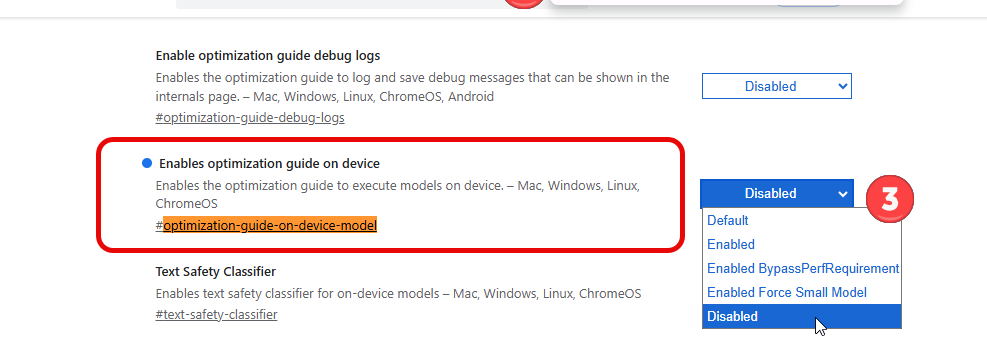
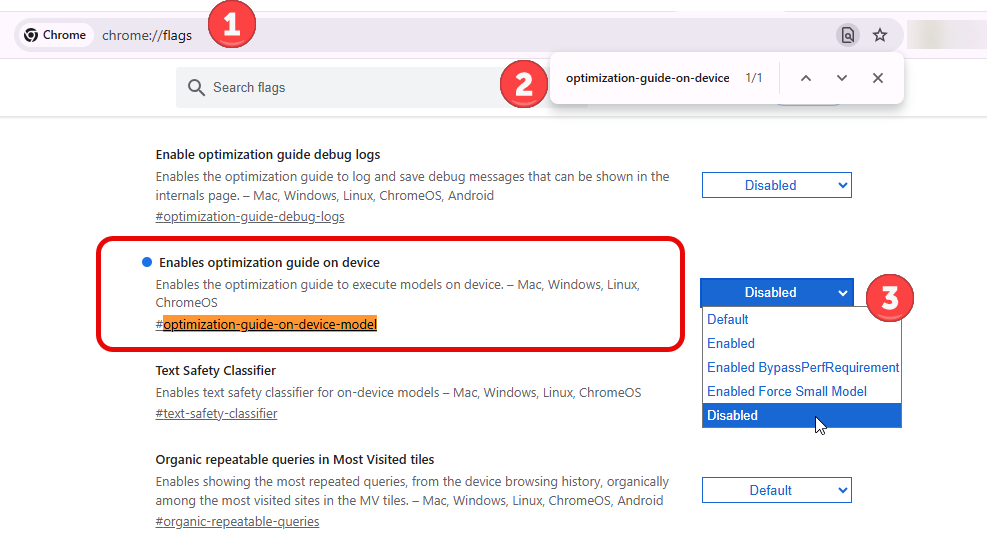
- Browse to
chrome://flags - Search for
optimization-guide-on-device-model - Set to
Disable(to remove and restart Chrome)
See If It’s Installed Now
On Mac
- Run this in Terminal: find ~/Library/Application\ Support/Google/Chrome -size +1G -ls 2>/dev/null
On Windows
- Search your C: drive for
weights.binand/or - Look for a folder named
OptGuideOnDeviceModelunder your Chrome user profile. Look in %LOCALAPPDATA%\Google\Chrome\User Data
Enterprise Centralized Removal Options
- On Windows Registry key: navigate to
HKEY_LOCAL_MACHINE\SOFTWARE\Policies\Google\Chrome, create a DWORD calledGenAILocalFoundationalModelSettingsand set it to 1 - Enterprise environments can also push policy via
GenAILocalFoundationalModelSettingsin Chrome’s enterprise policy framework
More info and articles
- Fantastic research and write-up on the issue by Alexander Hanff (LLM, CIPPE, CIPT)
Google Chrome silently installs a 4 GB AI model on your device without consent. At a billion-device scale the climate costs are insane https://www.thatprivacyguy.com/blog/chrome-silent-nano-install/ - Overview at the Register.
Chrome silently installs a 4 GB local LLM on your computer https://www.theregister.com/ai-and-ml/2026/05/07/chrome-silently-installs-a-4-gb-local-llm-on-your-computer/5230893






Add comment