
Over the past several days, I’ve spent a lot of time digging through FortiBleed research, public datasets, researcher findings, and incident analyses. The more I read, the more I realized something:
Most of the headlines are focusing on the wrong thing.
The common narrative is that FortiBleed is a Fortinet password leak.
That’s true—but it’s also woefully incomplete.
What makes FortiBleed remarkable is that it provides a rare look inside a modern credential-harvesting operation. Thanks to an exposed attacker server discovered by researchers, we aren’t just seeing the results of an attack. We’re seeing much of the attacker’s infrastructure, tooling, workflows, automation, and post-compromise activity. Down to a rarely seen view of their own Hashtopolis implementation for industrial-scale password cracking.
In cybersecurity, we don’t often get that opportunity.
FortiBleed Isn’t Just a Fortinet Story
One of the first misconceptions worth clearing up is that FortiGate devices were the only targets.
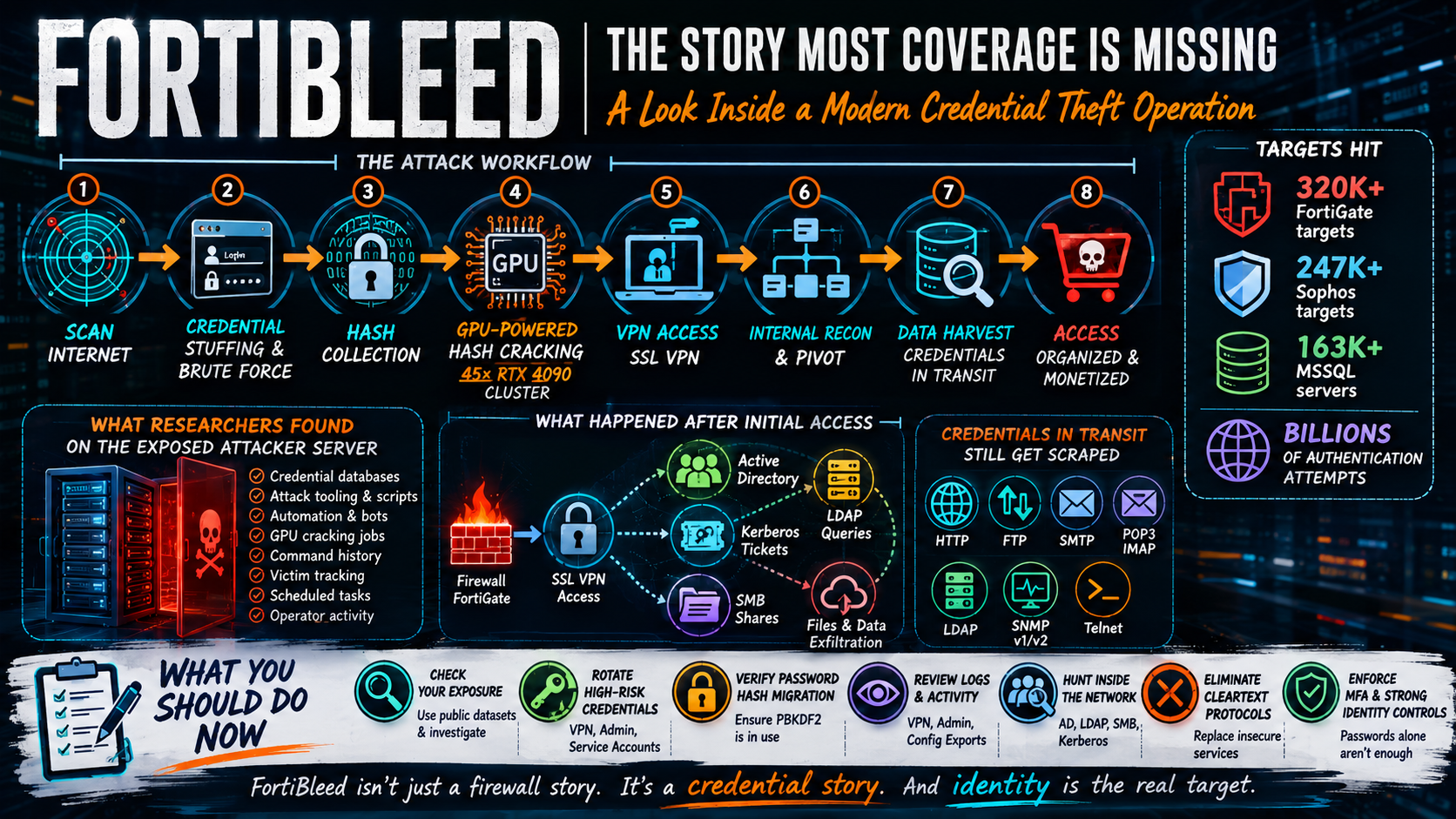
Based on publicly available research, we know the operators were also targeting:
- Sophos User Portal instances
- Microsoft SQL Server deployments
- Active Directory environments
- VPN infrastructure
- Internal enterprise services
I bolded that last item because THIS IS THE PART MOST PEOPLE ARE MISSING!
The attackers were accessing INTERNAL networks and scraping combos of cleartext and encrypted credentials — HTTP, FTP, mail protocols SMTP/POP3/IMAP, LDAP, SNMP, Telnet and Kerberos and NTLM hashes.
Fortinet appears to have been the largest target set, but the operation itself was focused on credentials.
The firewall was the starting point—not the objective. But, more on that later!
What Researchers Found
The operation came to light because the attackers accidentally exposed their own infrastructure. Cue the snickers.
Researchers (as far as I know, this was found by Volodymyr (Bob) Daichenko based in Ukraine) discovered an open directory containing:
- Credential databases
- Automation scripts
- Attack tooling
- Scheduled jobs
- Command histories
- Cracking infrastructure details
- Victim tracking information
This is exceptionally unusual.
Normally, defenders see indicators of compromise and forensic artifacts from victims. In this case, researchers were able to observe portions of the attacker’s actual environment.
That gives us (or, well, researchers who know what they’re looking at) a much clearer picture of how the operation worked.
The Attack Workflow
While details continue to emerge, the overall process appears to have looked something like this:
- Scan the internet for exposed targets.
- (E.g., FortiGates, Sophos, etc.)
- Perform credential stuffing using previously compromised credentials.
- Attempt brute-force authentication against exposed services.
- Obtain and crack password hashes where possible.
- (Here’s where the Hashtopolis came in, and their ~45 GPU cluster, probably costing $150-200k.)
- Validate working credentials automatically. (Scripts tested credentials and logged successful ones, which also fed the hash cracking)
- Access VPN infrastructure.
- (And, Bob’s your uncle!)
- Pivot into internal environments.
- (Here’s where the real nasty stuff starts, in my opinion.)
- Harvest additional credentials and data.
- (They captured HTTP, FTP, SNMP, Telnet, SMTP, LDAP, along with Kerberos tokens and NTLM hashes.)
- Organize and prioritize access for future use or resale.
- (The attackers scraped domain info from several sources, FortiCloud info, admin usernames, IP address lookups, etc., then categorized and tagged each by industry, size, revenue — meaning they were almost certainly preparing to sell initial access into the victim environments.)
- (How they matched the device to the organization — SSL certs, DNS, WhoIs/ASN lookup, Usernames, metadata scraped from the config files like hostnames, contact info, VPN realms, domain references.)
This wasn’t a single attack.
 | If you like this content, you might like my weekly podcast – Packet Protector, the podcast at the intersection of networking and security. Available on YouTube or your favorite podcast app. |
The Password Hash Detail Everyone Should Understand
One of the most important technical lessons from FortiBleed involves password storage and hash migration.
Fortinet improved password protection in newer versions of FortiOS by moving away from older SHA256-based password hashing and toward PBKDF2 (Password-Based Key Derivation Function 2).
That’s good security engineering.
However, many organizations may not realize that existing passwords often remained stored using the older hash format until those credentials were updated or re-saved.
Read Fortinet’s guidance here.
In practical terms:
- Device patched? Good.
- Software upgraded? Good.
- Existing credentials never re-saved? Not good.
If attackers obtained those older hashes, they could crack them offline.
The key lesson is that patching and upgrading do not always mean historical credentials are automatically protected.
Whoever is managing these (and similar) devices should verify how administrator credentials are currently stored and whether legacy hashes remain present.
The Mystery of Stolen Firewall Configs
Some of the information in their little attacker databases means they had full firewall configuration files. What’s not 100% clear yet is how the attackers got those config files. In fact, I don’t know what % of the victim population had full configs. I have some working theories or possibilities but I haven’t seen any reports yet calling out likely scenarios.
- Theory #1: Already-compromised admin accounts
- Via successful credential stuffing, and recursive testing as they fed the hash cracker.
- Theory #2: Prior Fortinet credential leaks
- Possibly some were from prior credential leaks, but researchers with knowledge of the full lists (like Kevin Beaumont) have confirmed there is no direct correlation even with all prior breaches combined. This could have contributed to a subset of the victimized devices, and it’s likely these also were fed to the hash cracker.
- Theory #3: Compromised support/cloud credentials
- It’s possible (I think far less likely) that attackers compromised FortiCloud, Fortinet support portals, or backup repositories somewhere. Although I’d hope Fortinet would have visibility into brute force attempts on their own cloud platforms, but who knows.
- It’s possible (I think far less likely) that attackers compromised FortiCloud, Fortinet support portals, or backup repositories somewhere. Although I’d hope Fortinet would have visibility into brute force attempts on their own cloud platforms, but who knows.
Why the 45-GPU Cracking Cluster Matters
One detail that has generated significant attention is the reported use of a cracking cluster built around 45 NVIDIA RTX 4090 GPUs. (Where’s that Tim the Toolman Taylor grunt we all know and love??)
The important takeaway isn’t the number of GPUs. It’s what that infrastructure tells us about the operation.
This is straight-up industrialized password-cracking using Hashtopolis and dedicated GPU resources. Several of the reports I read estimate the infrastructure cost was $150-200k.
This wasn’t an opportunistic actor running password attacks from a laptop.
This was a structured operation investing significant resources into turning stolen hashes into usable credentials.
What’s important isn’t the hardware — it’s the level of automation and scale. These guys were going gangbusters on the hash cracking.
The Firewall Was the Doorway, Not the Destination
Another common misconception is that this was primarily a firewall compromise.
The available evidence suggests that many compromises continued well beyond perimeter access.
Researchers observed activity involving:
- SSL VPN access
- Active Directory enumeration
- LDAP queries
- SMB shares
- Kerberos artifacts
- Group Policy information
- Internal file repositories
Once valid credentials were obtained, the objective shifted toward expanding visibility and increasing access.
This is why organizations should avoid treating FortiBleed as a perimeter-only event.
If credentials were compromised, the investigation should extend beyond the firewall.
The Cleartext Protocol Problem
One aspect of the operation that deserves more attention is credential harvesting from network traffic.
Researchers reported evidence of attackers collecting credentials from protocols including:
- HTTP
- FTP
- Telnet
- LDAP
- SMTP
- POP3
- IMAP
- SNMPv1/v2
Many organizations still have some of these protocols present somewhere in their environment.
Often they’re legacy systems. Sometimes they’re management interfaces. Occasionally they’re forgotten entirely.
FortiBleed serves as another reminder that cleartext protocols continue to create unnecessary risk.
By the way — my book has 80 pages on hardening network infrastructure.
How to Determine Whether You’re Affected
Several public datasets and lookup services have emerged to help organizations identify potential exposure.
I found discrepancies across the data sets; depending on where/how the data was pulled, a victim may appear one place and not another.
Being listed does not automatically mean an organization experienced a confirmed compromise.
However, if your organization appears in one of these datasets, I recommend treating that as a signal to investigate further.
Review:
- VPN access logs
- Administrative activity
- Configuration exports
- Authentication events
- Privileged account usage
- Active Directory activity
Current sites with searchable lists
Check at least 2-3 sites/lists, both by your public IP address(es) and domain(s) as well as domains of any third parties, VAR/integrator, MSP/MSSP providers current and past.
- Full List of Victim domains: https://blog.gayint.org/intel/fortibleed.txt
- Full List of Victim IPs: http://owned.lab6.com/~gossi/research/public/fortibleed/some-fortibleed-ips.txt
- Domain search by Hudson Rock https://www.hudsonrock.com/fortinet
| | If you like this content, you might like my weekly podcast – Packet Protector, the podcast at the intersection of networking and security. Available on YouTube or your favorite podcast app. |
What Security Teams Should Do Now
Whether your organization appears in public datasets or not, the defensive actions are the same.
1. Rotate High-Risk Credentials
Prioritize:
- VPN users
- Administrative accounts
- Service accounts
- Shared credentials
- Privileged identities
Especially where password reuse may exist.
2. Verify Password Hash Migration
For Fortinet administrators, confirm whether credentials are protected using current hashing mechanisms and whether legacy hashes remain present.
Here’s that Fortinet KB article link again – https://community.fortinet.com/fortigate-3/technical-tip-enforcing-pbkdf2-as-hash-function-for-administrator-accounts-in-fortios-v7-2-11-and-later-220652
3. Review VPN and Administrative Activity
Look for:
- Unexpected login locations
- New administrator accounts
- Unusual configuration changes
- Suspicious access patterns
4. Hunt Beyond the Firewall
Review:
- Active Directory activity
- LDAP queries
- Kerberos usage
- SMB access
- Privileged group changes
Do not assume the firewall was the only affected system.
5. Eliminate Cleartext Protocols
Where possible, identify and remove unencrypted management protocols. We’re in a new world, and assuming just because something is INSIDE the network it’s safe is an ill-informed assumption in 2026.
- Telnet
- FTP
- HTTP management interfaces
- SNMPv1/v2
Where possible, replace them with encrypted alternatives. If you need guidance, my book Wireless Security Architecture, has an 80-page chapter on hardening network infrastructure.
6. Strengthen Identity Controls
The strongest long-term lesson from FortiBleed may be this:
Credentials remain one of the most valuable assets attackers can obtain.
In the beginning, it was credit card numbers and banking info. Then it was World of Warcraft and other gaming logins. Now it’s crypto and network administrative accounts because living off the land is the new hotness for attackers.
Strong MFA, identity monitoring, privileged access controls, and password hygiene are the 101 defenses that are still impactful. Remember not all MFA is created equal. That’s a blog for another day.
Guidance from Industry
Canada Centre for Cybersecurity Alert
Alert – AL26-014 – FortiBleed leak of thousands of compromised credentials impacting Fortinet devices
CISA Advisory
CISA Urges Hardening Fortinet Devices After Reports of Credential Exposure
Fortinet on updating from SHA-256 to PBKDF2 hashes
Technical Tip: Enforcing PBKDF2 as hash function for administrator accounts in FortiOS v7.2.11 and later
Gurucul
Threat hunting and IoCs for FortiBleed
Final Thoughts
FortiBleed is important not because it exposed another batch of passwords.
Cybersecurity sees credential leaks every day.
FortiBleed is important because it exposed how a modern credential-harvesting operation actually functions.
We got to see the tooling. We got to see the automation. We got to see the prioritization. We got to see what happens after credentials are stolen.
And perhaps most importantly, we got a reminder that identity—not firewalls, not endpoints, not servers—remains one of the primary battlegrounds in modern cybersecurity.
Good luck with your thrunting and mitigations!
Additional Links
Ars Technical coverage
https://arstechnica.com/security/2026/06/massive-breach-spills-credentials-for-thousands-of-sensitive-networks
Original researcher: Volodymyr “Bob” Diachenko (SecurityDiscovery, Ukraine)
- https://www.linkedin.com/in/vdyachenko
- https://www.linkedin.com/feed/update/urn:li:activity:7471222472193830913/ (original post)
- https://www.linkedin.com/feed/update/urn:li:activity:7473675251638394881/ (update)
Contributing researcher: Kevin Beaumont (Snarky researcher out of the UK whose research and posts I find highly valuable)
- https://www.linkedin.com/in/kevin-beaumont-security/
- https://doublepulsar.com/
- https://doublepulsar.com/fortibleed-75k-fortinet-firewalls-have-admin-passwords-cracked-60299faa65f8 (original post)
- https://doublepulsar.com/an-update-on-fortibleed-whats-happening-with-victim-orgs-c0671a50e7f4 (update)
Other 3rd party analysis and contributors
- SpyCloud analysis
- CloudSEK analysis
| | If you like this content, you might like my weekly podcast – Packet Protector, the podcast at the intersection of networking and security. Available on YouTube or your favorite podcast app. |
# # #








Add comment